| Support Category: Login Inquiry |
| Specialist Notes: |
IMPORTANT! Customers must have a myOmnicell account to access Omnicell Institute. Once they have an account with myOmnicell, they can log in using their username and password on the myOmnicell Customer Portal page. Once logged in, they can use 'Training' on the menu across the myOmnicell Customer Portal landing page or they can select the 'Training' tile. Both options open a new tab/window to Omnicell Institute. Note: If a user has not registered, please provide the How can I create an Account? SR. |
Standard Response: |
To log into Omnicell Institute, you need to have a myOmnicell account. If you have created an account, kindly navigate to http://myomnicell.com.
Enter your username and password in the myOmnicell Customer Portal, which will log you directly into myOmnicell.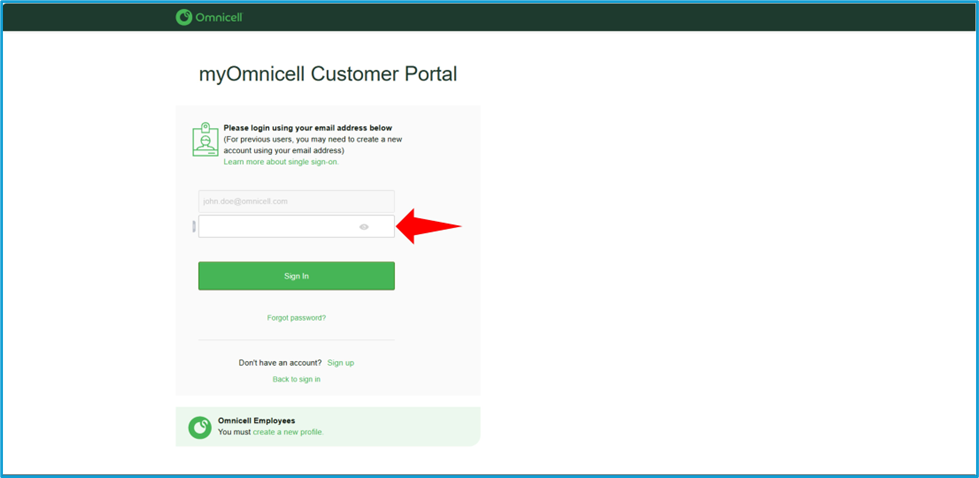
To access training on Omnicell Institute, select 'Training' from the menu across the myOmnicell Landing Page or select the 'Training' tile beside the 'Welcome' message.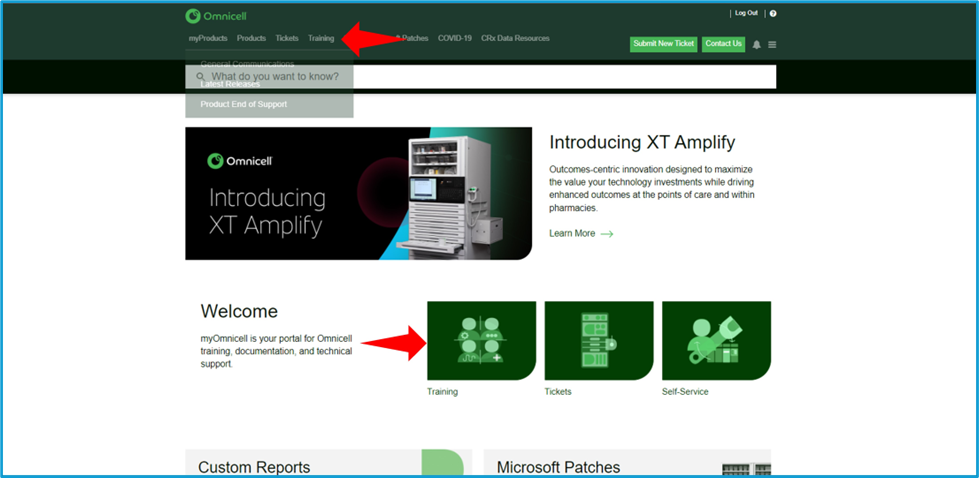
Both options should launch a new window/tab to access training on Omnicell Institute.